OpenAgentFleet · open-source public alpha v0.3.1
Give your agents a computer you can watch.
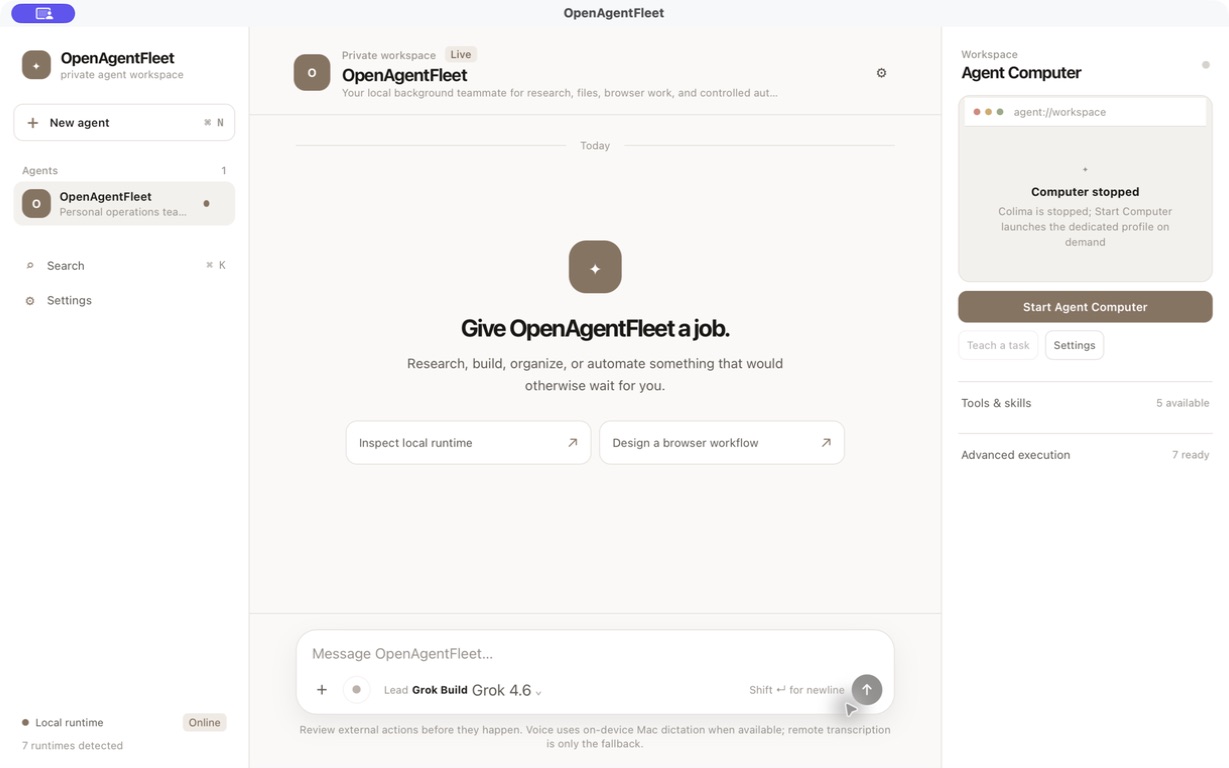
A local-first Mac, Linux and Windows app for agents that do real work in a separate Linux computer. Chat with them one-on-one or as a group, watch every step, approve the sensitive ones, and take over whenever you need to.
- Choose an engine Grok Build, Codex App Server, OpenCode, or optional Pi.
- Watch the separate computer Browser and desktop work runs in its own Linux guest.
- Take control Stop, approve, or take the controls yourself.
- Local workspace
- Observable computer
- Human in the loop
- Watch
- Stop
- Take control
- Approve
Next version · preview, not in 0.3.1
A brief they share, and memory you approve.
The clips and screenshots below are recordings of a preview build running sample data. None of this ships in the 0.3.1 download. Both clips are silent, and neither one runs a provider or publishes anything to GitHub. The code is in an open pull request against main and can still change.
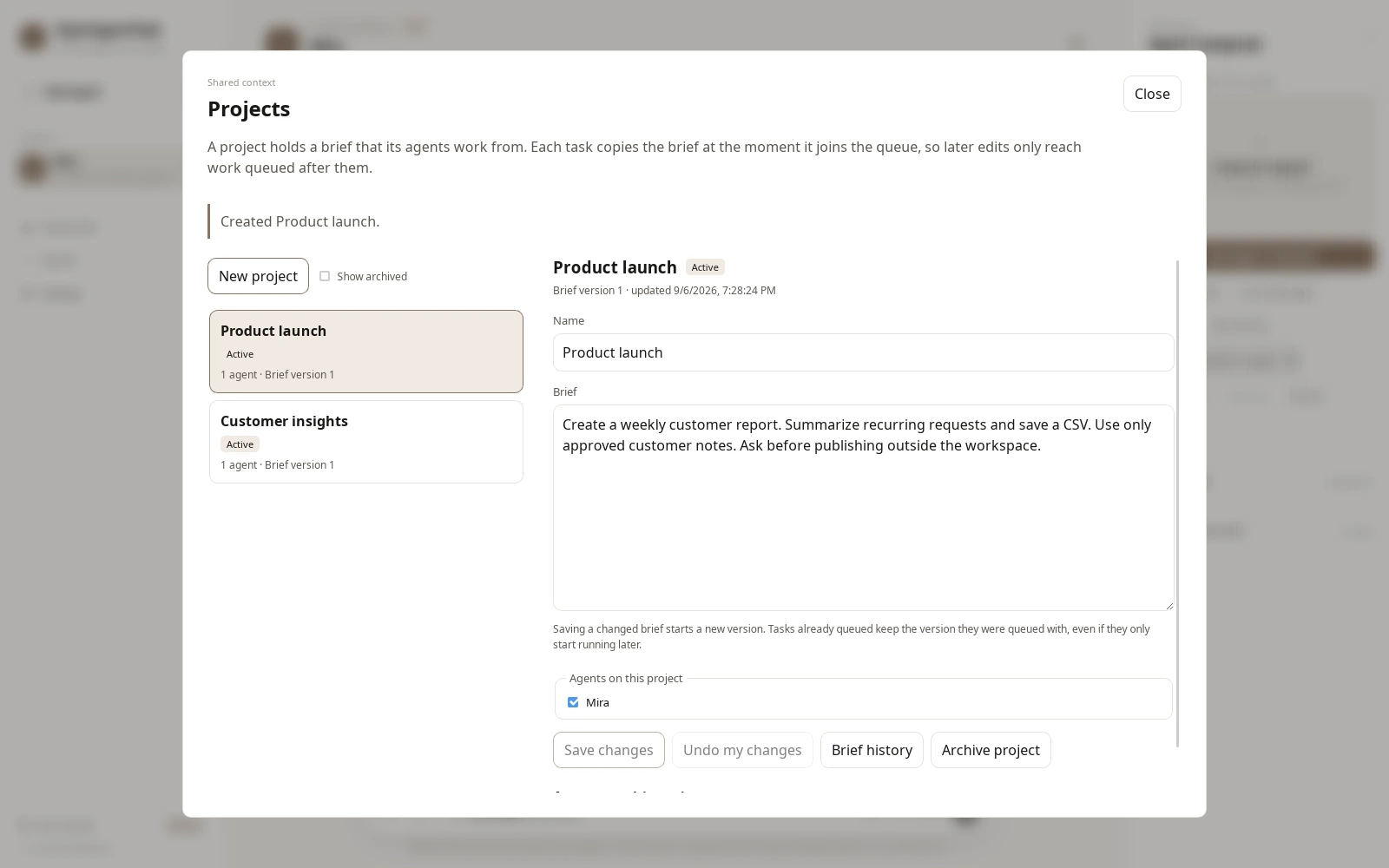
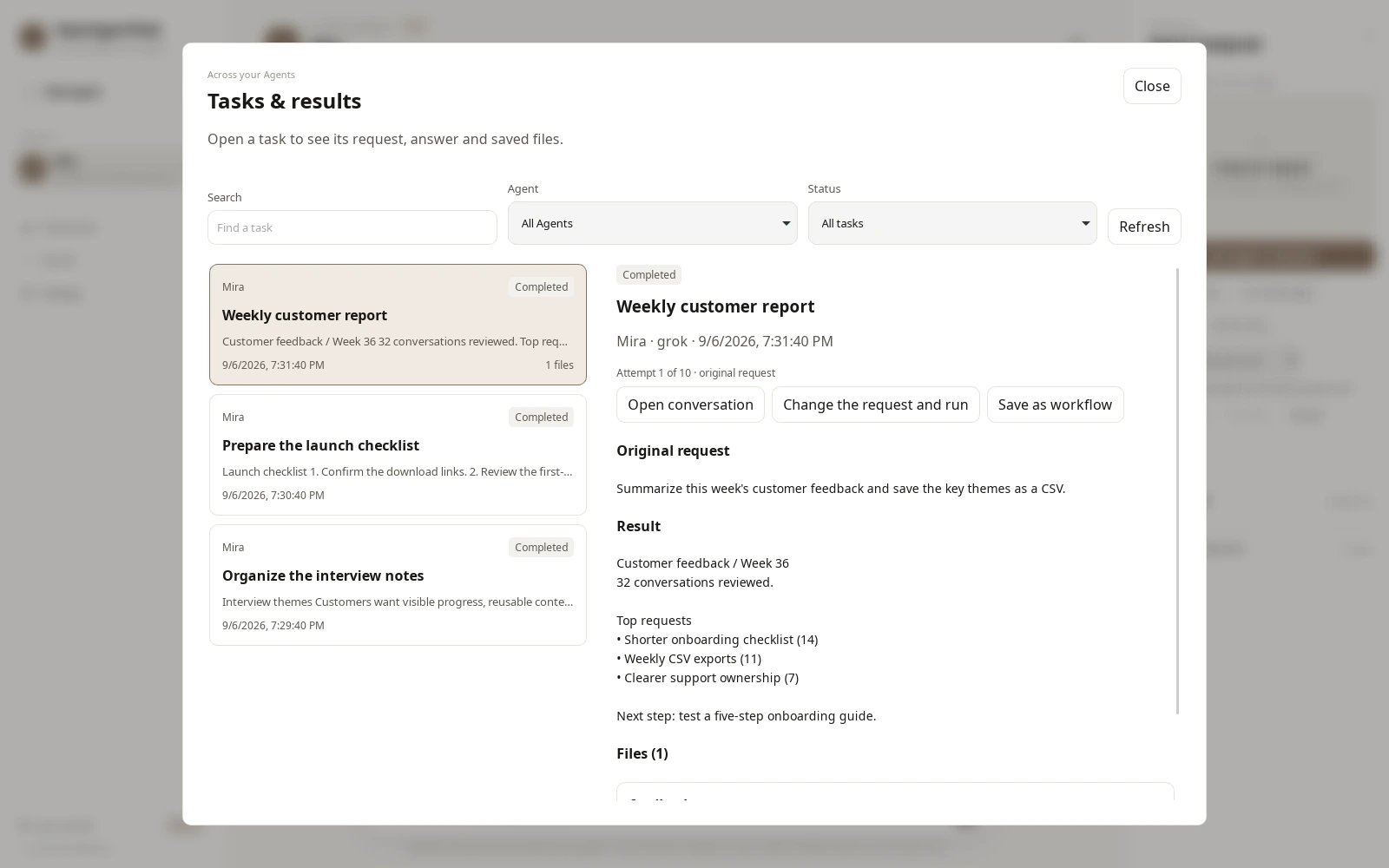
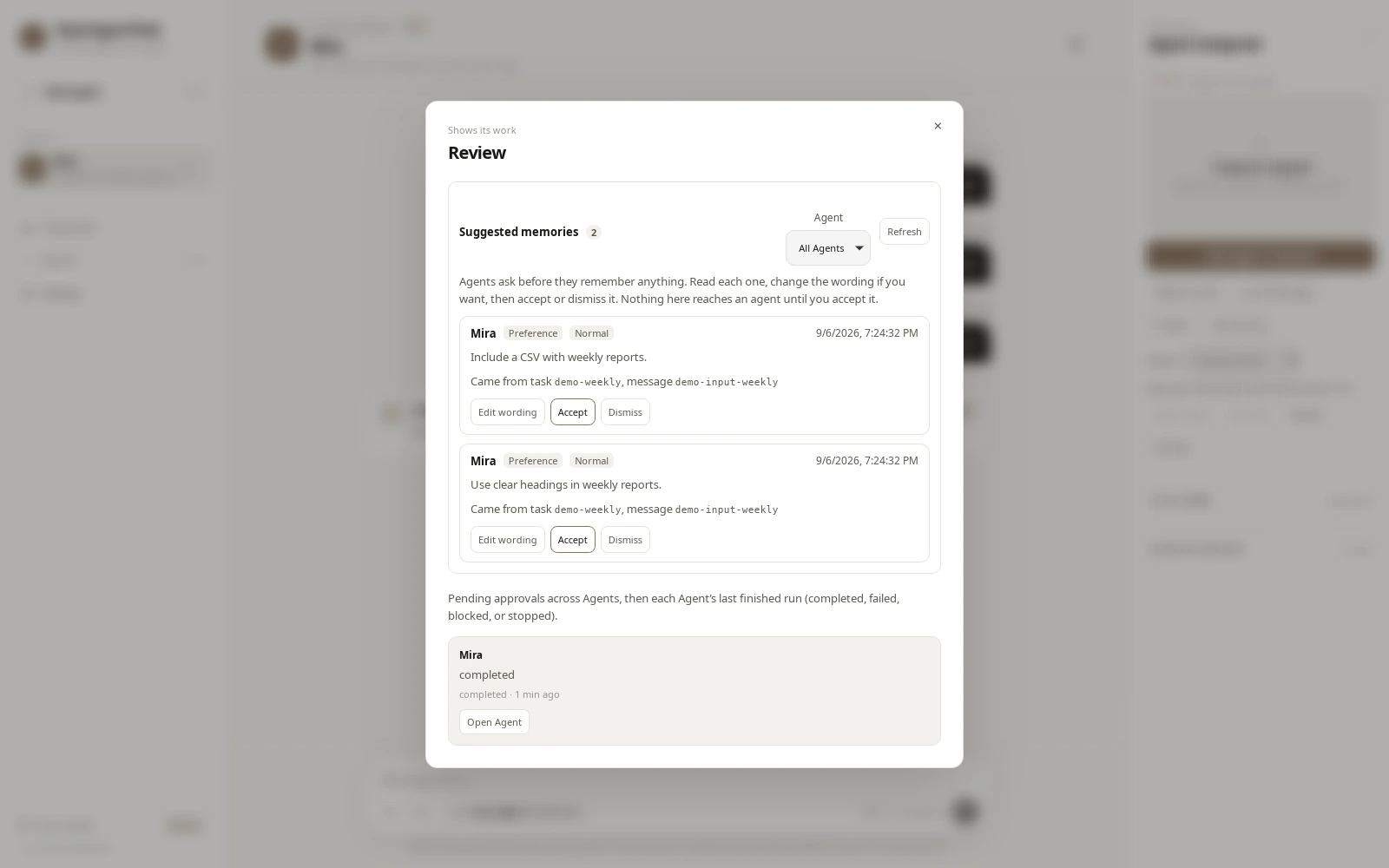
Also in the pull request, not shown in the clips:
- Retry and revise keep the earlier attempt. Its answer, its files and its brief version stay where they were.
- Memory proposals wait in the review dialog. Proposals become memory only after you accept them.
- GitHub work waits for you. OpenAgentFleet pushes the reviewed branch only after you approve publication, and opens the pull request as a draft.
The workflow
Four steps from a fresh install to a working agent.
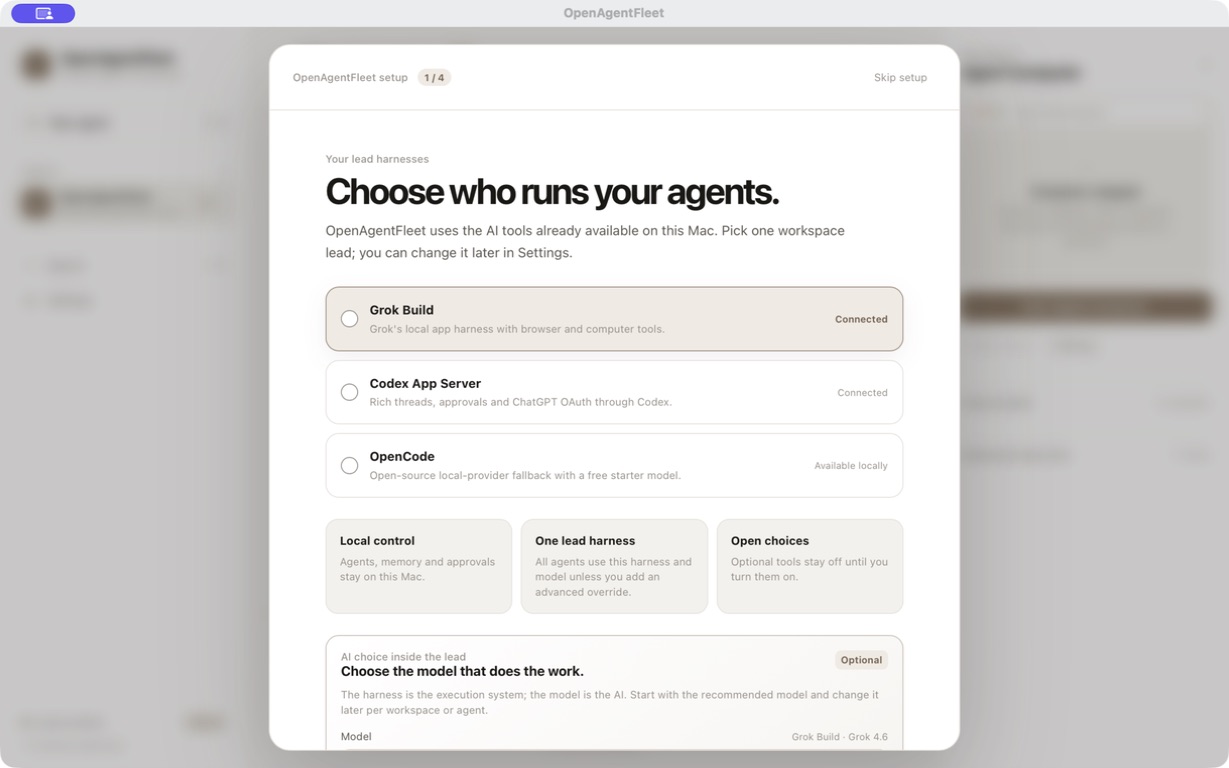
The actual setup screens of the current alpha. Nothing turns itself on.
Agent Computer
A separate computer you can watch.
Browser and desktop work happens on a separate Linux computer, not on the host’s own desktop. Its screen sits in the app, in plain sight, started only when a job needs it. A Pi engine does not receive Computer MCP.
Chromium
Browsing, sign-ins and downloads happen there — never in your own browser.
Terminal
Command-line work runs on that computer, against its own files.
Files
What the agent fetches and edits stays there until you decide to take it out.
Your hand on the wheel
Watch it live, stop the run at any point, or take over the session yourself.
Capabilities
What the current build actually does.
- Tune the agent computer
- The default computer starts with 4 GiB of RAM and 25 GiB of disk. Adjust CPU, RAM, disk and swap for the job, choose Ubuntu 24.04 by default or Ubuntu 26.04 / Debian 13, with a host-space guard and no shrinking of an existing larger disk.
- Named agents, local memory
- Each agent keeps its own role and memory on your computer. You can review, edit or archive what it remembers.
- Group chat and teamwork
- Put several agents in one conversation, or mention a teammate from any chat. Agent-to-agent collaboration is opt-in per agent, allowlisted and depth-capped — handoffs happen in the chat where you can see them.
- Approval rules you can save
- Approve once, keep the decision: a saved rule covers exactly that agent, that resource and that operation — nothing broader.
- Four engines, one workspace
- Grok Build is the default. Codex App Server, bundled OpenCode and optional Pi are selectable. Pi signs in with
pi /loginand has no Agent Computer. Picking a Grok or GPT id in Pi still runs through Pi, not Grok Build or Codex. - Approvals for sensitive actions
- Sensitive and external steps wait for your explicit yes. Passwords, two-factor codes and payments stay with you, on the host.
- Settings that match your eyes new in 0.3.1
- Paper, Ink, Forest or Dusk accents, roomy density, 85–135% text size, soft or sharp corners and a reduce-motion switch. The Agent Computer’s CPU, RAM, disk, swap and OS image sit in Settings rather than behind an Advanced block.
- Private phone control optional
- An Android companion with Chat, Computer, Routines and Settings screens pairs by QR over a private, encrypted connection such as Tailscale. The desktop stays the execution host. Off by default, and there is no store build yet.
Trust
Where the boundary actually is.
What stays on your computer
Conversations, agent memory, attachments and the approval record are stored by the local
OpenAgentFleet service. Only what you choose to send to an engine leaves the machine — through
that provider’s own CLI and your own account. Pi credentials stay in ~/.pi.
What the Agent Computer is — and isn’t
The Agent Computer is the boundary for browser and desktop work: a separate Linux machine whose screen you can always watch. It is not full provider-process isolation — the engines’ CLIs themselves currently run on the host (macOS or Linux). Sensitive input stays on the trusted host. On Linux the Computer uses Docker Engine, not Colima.
v0.3.1-alpha
Download the alpha, on Mac, Linux and Windows.
OpenAgentFleet is open source and in public alpha. Version 0.3.1-alpha ships as a
signed, notarized DMG for Apple Silicon
(SHA-256 570731b921b64da9ee2d94d35467b6388372b48146e8270eb1642c9309209f02),
plus unsigned Linux .deb, .rpm and .AppImage packages and an unsigned Windows
installer. Every checksum is in SHA256SUMS on the
release page.
It is an alpha in the honest sense: not feature-complete, not production-ready. Intel Macs are not supported.
- Apple Silicon Macsigned, notarized 0.3.1 DMG; Gatekeeper was verified on the build host, not on a second Mac
- Linux & Windowsunsigned 0.3.1 packages: .deb / .rpm / .AppImage and an NSIS installer; Docker is recommended and the installer does not start it
- Bring an engineGrok Build is the default; Codex, OpenCode or Pi if you have them
FAQ
The useful answers, when you need them.
A few plain-language boundaries for the current alpha. The full setup and troubleshooting guide lives in the repository.
Is OpenAgentFleet a cloud service?
The workspace, memory and Agent Computer run on your computer. Your selected provider may still send prompts to its own remote AI service.
What is the Agent Computer?
A separate Linux desktop with Chromium, Terminal and Files. You can watch it, stop it or take control when a human needs to handle a sign-in or sensitive step.
Is the whole agent isolated from macOS?
Not yet. The Linux computer is the browser and desktop boundary. Provider CLIs currently run as normal processes on the host (macOS or Linux).
Do I need Grok or Codex?
No. Grok Build is the default. Codex App Server, bundled OpenCode and optional Pi are selectable. Pi needs the pi CLI and pi /login. It has no Agent Computer and no search MCP.
Is there a Linux or Windows desktop app?
Yes. v0.3.1-alpha packages unsigned .deb, .rpm and .AppImage for Linux and an unsigned NSIS installer for Windows. Docker is recommended for the Agent Computer and the installer does not start it. One caveat before you install on Windows: Computer View on Docker Desktop with WSL2 failed live QA during the 0.3.1 release check.
Can several agents work together?
Yes. Group chats and teammate mentions have been in since 0.3.0. Collaboration is off until you enable it on an agent, partners are allowlisted, chains are depth-capped, and every handoff is visible in the chat.
Can I use the app from my phone?
Yes as an optional remote-client path. The desktop host stays the execution host and the phone pairs by QR over a private network such as Tailscale. There is no Play Store or App Store build yet.
Can I use projects, task retries or the GitHub review flow today?
No. Projects, shared briefs, task retry and revise, reviewed memory proposals and the GitHub issue-to-draft-pull-request flow are in an open pull request, not in the 0.3.1 download. The clips in the next version section were recorded on a preview build with sample data.